

The internet makes it easier than ever to access information, communicate, and explore websites. However, every online activity can leave behind digital traces, including browsing history, IP address information, and other data that may reveal details about your online behavior. This is where privacy-focused browsing tools become useful.
HidingMe com is a search term associated with online privacy and anonymous browsing. People searching for this term may want to understand what the website offers, how online hiding or proxy services work, and whether such tools can help protect their digital identity.
Before using any privacy-related website, it is important to understand the technology behind it, its potential benefits, and its limitations. This guide explores online proxy services, IP address protection, browsing privacy, and the safety considerations users should keep in mind when evaluating HidingMe com.
What Is HidingMe com?
HidingMe com is a name users may encounter while searching for services related to online privacy and anonymous browsing. However, its exact ownership, current functionality, available features, and privacy policies should be verified directly through the website.
The name suggests an interest in hiding or protecting online identity, but a website’s name alone does not establish that it provides a secure proxy, VPN, or complete anonymity.
Generally, websites in this category focus on helping internet users understand or manage their online visibility. Depending on the service, this may involve proxy technology, IP address masking, or other privacy-related features.
It is important to distinguish between a web proxy and a VPN because they offer different levels of protection.
How Do Online Privacy and Proxy Services Work?
To understand services associated with HidingMe com, it helps to know how proxy technology works.
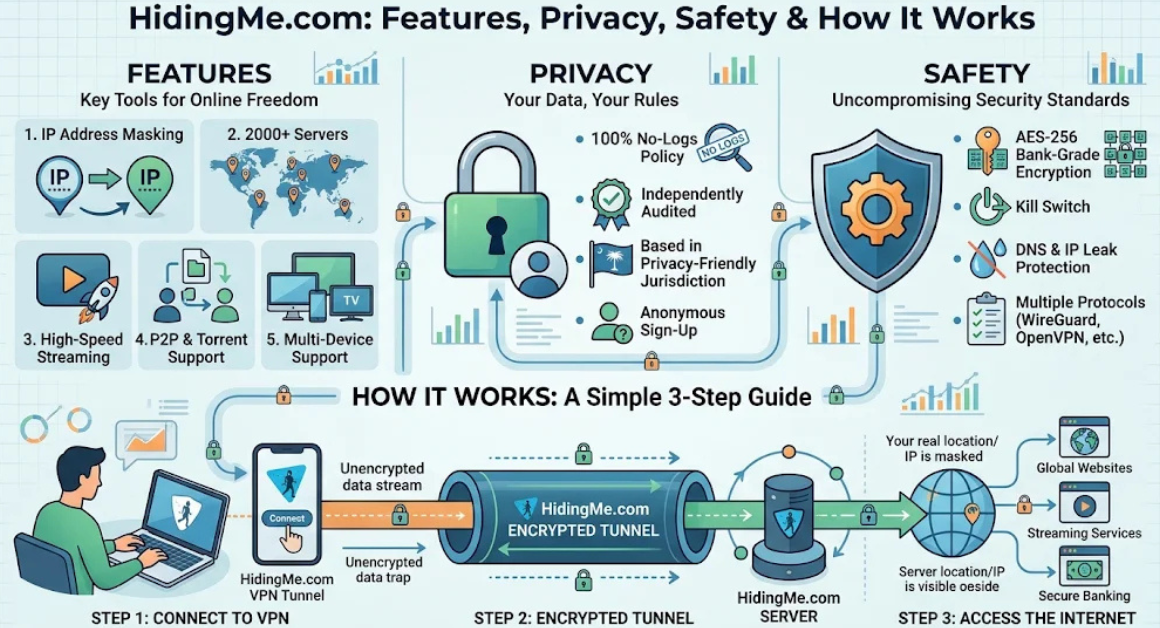
A proxy server acts as an intermediary between your device and the website you want to visit. Instead of connecting directly to the destination website, your browser sends its request through the proxy server.
The basic process looks like this:
- You open a proxy service in your browser.
- You enter the address of the website you want to visit.
- The proxy server receives your browsing request.
- It forwards the request to the destination website.
- The destination website sends its response back through the proxy.
- The proxy delivers the requested content to your browser.
Depending on the proxy configuration, the destination website may see the proxy server’s IP address instead of your original public IP address.
However, this does not automatically make your entire internet connection anonymous. Other identifying information may still be exposed.
Key Benefits of Using Online Privacy Tools
Privacy tools can provide several advantages when used appropriately. Their effectiveness depends on the technology, security practices, and privacy policies of the individual service.
1. IP Address Masking
Your public IP address can reveal information about your internet connection and approximate geographic location.
A proxy server may replace your original IP address with its own when communicating with a destination website. This can make it harder for that website to identify your original network address.
However, IP masking does not guarantee complete anonymity.
2. Improved Browsing Privacy
Privacy-focused services can help reduce the amount of identifying information shared directly with websites.
Some proxy tools provide an additional layer between your browser and the websites you visit. This may be useful when you want to limit direct exposure of your network information.
Still, cookies, browser fingerprinting, account logins, and other tracking methods can reveal information about your browsing activity.
3. Access to Certain Restricted Websites
Some websites restrict access based on geographic location, network policies, or IP addresses.
A proxy may allow users to access certain websites through a different network address. However, this depends on the proxy’s location, capabilities, and the restrictions imposed by the destination website.
Users should always follow applicable laws and website terms of service.
4. Convenience for Everyday Browsing
Browser-based proxy services can be convenient because they may not require installing additional software.
If a service supports web-based browsing, users can potentially access it through an ordinary browser.
Before entering personal information, however, users should check whether the service uses secure connections and clearly explains how browsing data is handled.
HidingMe com vs. VPN: Understanding the Difference
One common question surrounding anonymous browsing services is whether a proxy provides the same protection as a VPN.
The answer is no. Although both technologies can help change the IP address visible to destination websites, their operation and coverage differ.
| Feature | Web Proxy | VPN |
|---|---|---|
| Hides original IP from destination websites | Usually | Usually |
| Protects all device internet traffic | Generally no | Generally yes |
| Encrypts traffic between device and service | Depends on the connection | Typically yes |
| Browser-based access | Often | Usually requires an app or system configuration |
| Protects other applications | Generally no | Usually yes |
| Privacy depends on provider | Yes | Yes |
A web proxy is often suitable for routing individual browser requests. A VPN creates an encrypted connection between your device and the VPN server, typically covering traffic from multiple applications.
Neither technology guarantees complete anonymity. The provider’s logging practices, security standards, and jurisdiction remain important considerations.
Is HidingMe com Safe to Use?
Safety is one of the most important considerations when evaluating an unfamiliar privacy website.
A service may advertise anonymous browsing or IP protection, but those claims should not automatically be treated as proof of security.
Without independently verified information about HidingMe com’s ownership, technical infrastructure, privacy policy, and security practices, it would be inaccurate to declare the website completely safe or unsafe.
Before using it, consider the following checks:
Check the HTTPS Connection
Look for HTTPS in the website address. A secure HTTPS connection helps protect information exchanged between your browser and the website from interception while in transit.
However, HTTPS does not prove that the website operator is trustworthy.
Read the Privacy Policy
A reliable privacy service should explain:
- What information it collects.
- Whether it stores IP addresses.
- Whether browsing activity is logged.
- How long collected information is retained.
- Whether information is shared with third parties.
- How users can request data deletion.
A clear privacy policy makes it easier to understand what happens to your information.
Avoid Sharing Sensitive Information
Be careful when using unfamiliar proxy websites.
Avoid entering sensitive details such as:
- Banking credentials.
- Credit card information.
- Personal identification numbers.
- Private email passwords.
- Confidential business information.
A proxy provider may be able to process or observe information passing through its infrastructure, depending on its configuration and encryption.
Check for Suspicious Advertisements
Some free browsing services rely on advertising to generate revenue. Excessive pop-ups, unexpected redirects, fake download buttons, and suspicious notifications can indicate potential security risks.
Close suspicious pages rather than interacting with unfamiliar advertisements.
How to Browse More Privately Online
Whether you use HidingMe com or another privacy-related service, good browsing habits are essential.
Here are some practical ways to improve your online privacy.
1. Use a reputable browser.
Choose a browser with established security features, regular updates, and privacy controls.
2. Keep your software updated.
Browser and operating system updates often include security improvements that protect against newly discovered vulnerabilities.
3. Review website permissions.
Check which websites can access your location, camera, microphone, and notifications.
4. Manage cookies regularly.
Cookies can help websites remember preferences, but some are also used for advertising and tracking. Review your browser’s cookie settings.
5. Use strong, unique passwords.
Avoid reusing passwords across different websites. A password manager can help generate and store stronger credentials.
6. Enable two-factor authentication.
Two-factor authentication adds another security step when signing in to supported accounts.
7. Be careful on public Wi-Fi.
Avoid accessing sensitive accounts over untrusted networks unless you have appropriate security protections.
These measures work together to reduce privacy risks. No single tool can protect against every online threat.
Common Limitations of Free Proxy Services
Free proxy services can be attractive because they offer access without requiring a paid subscription. However, free access does not necessarily mean that a service provides strong privacy or reliable performance.
Some potential limitations include:
- Slower browsing speeds: Free servers may have limited bandwidth or too many users.
- Limited server locations: Users may have fewer geographic options.
- Advertising: Some services display advertisements to support their operations.
- Unclear logging policies: Not every provider explains how browsing information is stored.
- Website compatibility issues: Certain websites may block proxy traffic.
- Limited security features: Basic proxies may not offer the encryption and protection associated with a reputable VPN.
These are general limitations of free proxy services, not verified claims about HidingMe com.
Who Might Benefit From Online Privacy Services?
Privacy tools can be useful for different types of internet users.
Students and Researchers
Students and researchers often visit many websites while studying, comparing information, and gathering resources. Privacy-conscious browsing practices can help them manage their digital footprint.
Remote Workers
People working remotely may use privacy tools when researching information or accessing public websites. However, they should follow their employer’s security policies and use approved tools when handling confidential information.
Frequent Internet Users
People who regularly browse the web may benefit from understanding IP masking, cookie management, browser fingerprinting, and other privacy technologies.
Privacy-Conscious Individuals
Anyone who wants more control over their online information can benefit from learning how proxy services, VPNs, and browser privacy settings work.
Frequently Asked Questions About HidingMe com
1. What is HidingMe com?
HidingMe com is a search term associated with online privacy and hiding digital identity. Its exact services and features should be confirmed through the official website rather than assumed from its name.
2. Does HidingMe com hide your IP address?
Whether HidingMe com provides IP address masking depends on its actual functionality. In general, a properly configured proxy can make destination websites see the proxy’s IP address instead of the user’s original public IP.
3. Is HidingMe com free?
Its current pricing and subscription arrangements should be checked directly on the website. Do not assume that a service is free simply because it is associated with online privacy.
4. Is HidingMe com a VPN?
A web proxy and a VPN are different technologies. A proxy typically routes selected browser traffic, while a VPN generally encrypts and routes traffic from the device through a VPN server. HidingMe com’s classification requires verification.
5. Can a proxy make me completely anonymous?
No. A proxy may hide your original IP address from destination websites, but it cannot eliminate every tracking method. Cookies, browser fingerprints, account activity, and information shared voluntarily can still identify you.
6. Can I use a proxy on my mobile phone?
Many web-based proxy services can be accessed through mobile browsers. However, compatibility and available features depend on the particular provider.
7. Are free proxy websites safe?
Not necessarily. Some may have weak privacy policies, excessive advertisements, or inadequate security practices. Always investigate the provider before sending information through its servers.
8. What is the difference between IP masking and online anonymity?
IP masking hides or replaces the IP address visible to a destination website. Online anonymity is broader and involves preventing identification through multiple sources, including account information, browser fingerprints, cookies, and network activity.
Conclusion
HidingMe com is a search term connected with interest in online privacy, anonymous browsing, and digital identity protection. Understanding the technology behind proxy services can help users make better decisions about how they access websites and protect their information.
Before relying on any unfamiliar privacy platform, verify its features, security practices, ownership, and privacy policy. Remember that hiding an IP address is not the same as achieving complete anonymity.
For safer internet use, combine trustworthy privacy tools with strong passwords, updated software, secure connections, and careful browsing habits. Exploring these practices will help you make more informed decisions and maintain better control over your digital footprint.